To take advantage of the Royalty Discount, log into your instance of Compass.
On the main screen, scroll down to near the bottom until you find the section labeled: “Royalty Discount Opt-In”

If you want to enroll in the discounted royalties, switch the toggle then click Save.
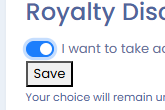
That is all that is required to enable your location to participate in the discounted Royalties.
Some things to consider:
This setting must be changed before 11:59 PM PST on the first business day of the month in order to enroll in the discount for the current month. Any changes after that will result in the discount taking effect the following month.
If at any time you wish to remove your location from the discounted Royalties, you can toggle that switch to off and click save. Again, this change needs to be made before 11:59 PM PST on the first business day of the month to count for the current month.
You can make adjustments to this toggle on a month-to-month basis if you wish, there are no requirements on the length of time you need to be enrolled in this program, nor any penalties for withdrawing your site from it.
Enrollment in this program will result in Royalty payments being automatically drafted from your account on the 15th of the month, discounted by 0.5%.
If you have any additional questions concerning this program, please reach out to itsupport@miraclemethod.com
Was this article helpful?
That’s Great!
Thank you for your feedback
Sorry! We couldn't be helpful
Thank you for your feedback
Feedback sent
We appreciate your effort and will try to fix the article