The utilization of the Parent and Child relationships for Commercial Accounts within Compass allows for a single Commercial Customer (known as the parent) to be associated with any number sub-customers (known as the children.)
Why would this be used?
The reason we would use a Parent / Customer setup would be in circumstances were a singular entity would have a direct relationship to several service locations. These could be something as simple as a Handyman service who has contracted Miracle Method to refinish some surfaces, or something as complex as a property management company who is responsible for several apartment complexes and a dozen or so office buildings.
The reason we would use a Parent / Customer setup would be in circumstances were a singular entity would have a direct relationship to several service locations. These could be something as simple as a Handyman service who has contracted Miracle Method to refinish some surfaces, or something as complex as a property management company who is responsible for several apartment complexes and a dozen or so office buildings.
How to create a Parent Account:
Creating a Parent account within Compass is just as easy as creating a new customer. The only differences would be ensuring the Customer record is flagged as Commercial at the top.
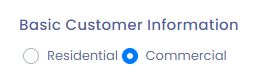
And at the bottom where the Commercial specific data records are recorded, ensure that the drop down list for Parent Account is blank.
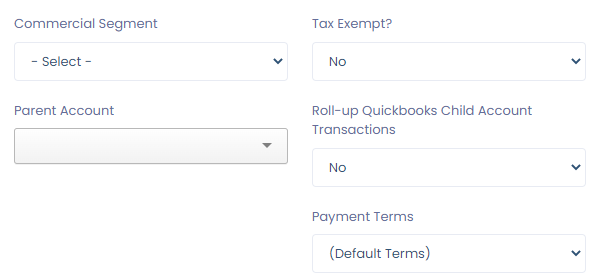
And at the bottom where the Commercial specific data records are recorded, ensure that the drop down list for Parent Account is blank.
How to create a Child Account:
You would create the child account in the same manner. The only difference is, at the bottom under the Commercial Customer specific details, you would use the drop down to assign a Parent Account,
The drop down is limited in how many records it will display, if you are unable to locate the Parent Account you are looking for, begin typing in the field to find it.
The drop down is limited in how many records it will display, if you are unable to locate the Parent Account you are looking for, begin typing in the field to find it.
You'll see in the above example, that this Child Account would be underneath Stark Industries. You'll also note, that Stark Industries already has 2 Children Accounts underneath it, as designated by the number of accounts listed in the brackets.
How to tell if the Parent / Child account relationship is setup correctly:
You'll be able to tell if the link between the Parent and Child account is set up when you view the Customer Information Page of either the Parent or Child account. The act of making the connection between the two triggers Compass to display some additional information on both pages, designating their relationship to each other.
From the Parent Account:
Parent accounts get an additional Tab in the center of the Customer Information screen displaying all the child accounts.

From the Child Account:
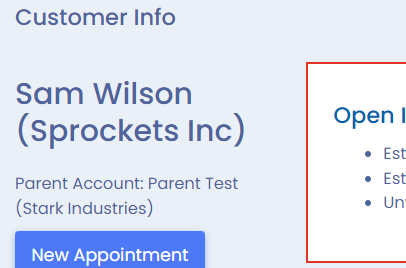
Child Accounts will have a "Parent Account" notation underneath the Customer Name in the upper left hand section of the Customer Information screen.

For more information on how to create a Commercial Customer. Please see the following link:
Adding A New Commercial Customer
Adding A New Commercial Customer
Was this article helpful?
That’s Great!
Thank you for your feedback
Sorry! We couldn't be helpful
Thank you for your feedback
Feedback sent
We appreciate your effort and will try to fix the article