Bring the mouse cursor over the Settings link on the
Navigation Bar.
A pop up menu will appear giving the option to mouse over
Company Admin.
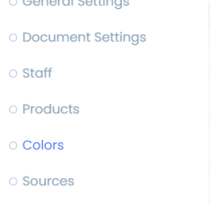 Click on the option on the sub-menu for Colors.
 Click
Click
on the Add Color button along the right-hand side.
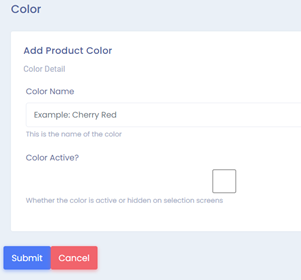
The Add Color Screen will open.
Type in the name of the color in the field under Color Name.
If the color is available and ready for customers to choose
as an option. Click the check box next to Color Active.
If it is not available yet, leave the check box blank.
Click on Submit.
Was this article helpful?
That’s Great!
Thank you for your feedback
Sorry! We couldn't be helpful
Thank you for your feedback
Feedback sent
We appreciate your effort and will try to fix the article