This screen is the first step in creating a work order for
technicians to perform a job at a customer location. Products and services can be entered as
individual line items, along with any relevant options available for each. Along the right-hand side, a running total of
services and goods is calculated as line items are entered.
At the top of this screen, the service address is
prominently displayed to ensure the right estimate is tied to the correct
location.
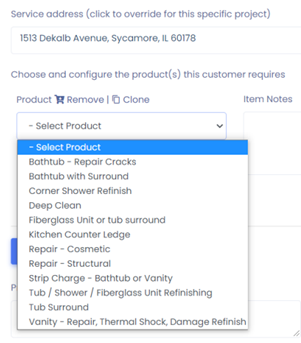

Clicking on the drop down underneath the address will present a list of products and services that can be added to the estimate.
Selecting one of the options will add it to the estimate.
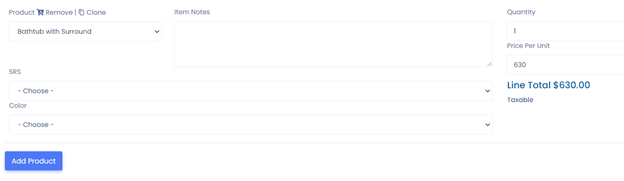
Once the product is added, any options for the product will
appear. Choose the corresponding response for the options presented. If there is more than one line item on the
estimate, click on Add Product for another form to populate.
Note: As line items are added to the estimate,
the section on the right-hand side will keep a running total of the estimated
costs.
Once
all line items and options are added to the estimate. The estimator will choose
their name from the drop-down list at the bottom of the page, then click Save
to finalize the estimate. Alternatively, they can click Cancel, at which point
all the information entered will be discarded.
Was this article helpful?
That’s Great!
Thank you for your feedback
Sorry! We couldn't be helpful
Thank you for your feedback
Feedback sent
We appreciate your effort and will try to fix the article